
Compliance Center: Creating a Clear Path Through Web Accessibility Regulations
Transforming RAMP’s compliance experience into a guided system for identifying relevant regulations, taking action, and tracking progress.
Role
Sole Designer — User Research, Interaction Design, Product Thinking, UI Design, Rapid Prototyping
Team
2 Software Engineers, 1 Accessibility Specialist
Timeline
6 Weeks, Launched May 2025
Overview
Accessibility regulations were becoming an increasingly important reason customers came to RAMP. Prospects often arrived after lawsuits, while upcoming regulatory deadlines were creating more urgency to act proactively. RAMP already supported much of the work required to become compliant, but it didn’t connect that work to specific regulations.
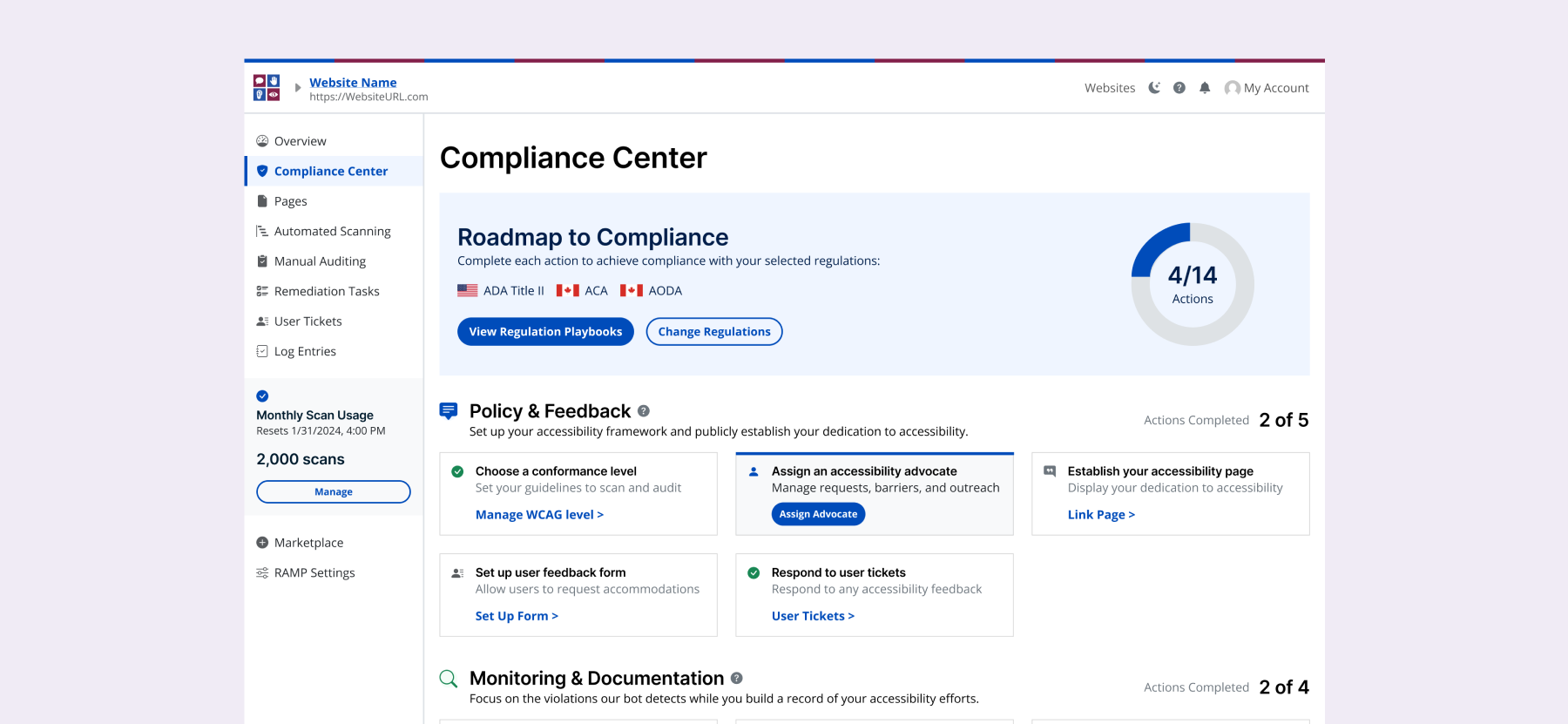
I designed Compliance Center to turn that gap into a guided experience. I translated regulatory requirements into an actionable roadmap that helped users identify relevant regulations, complete work across RAMP, and see their progress in one place. Within five months, Compliance Center reached 2x the lifetime adoption of RAMP’s previous compliance-related tools.
Solution: A clear path forward grounded in laws and regulations
Compliance Center helps users identify relevant accessibility regulations, then translates them into a single, actionable roadmap across RAMP. Each step explains why it matters, connects users to the right workflow, and keeps progress visible.
Find the regulations that apply
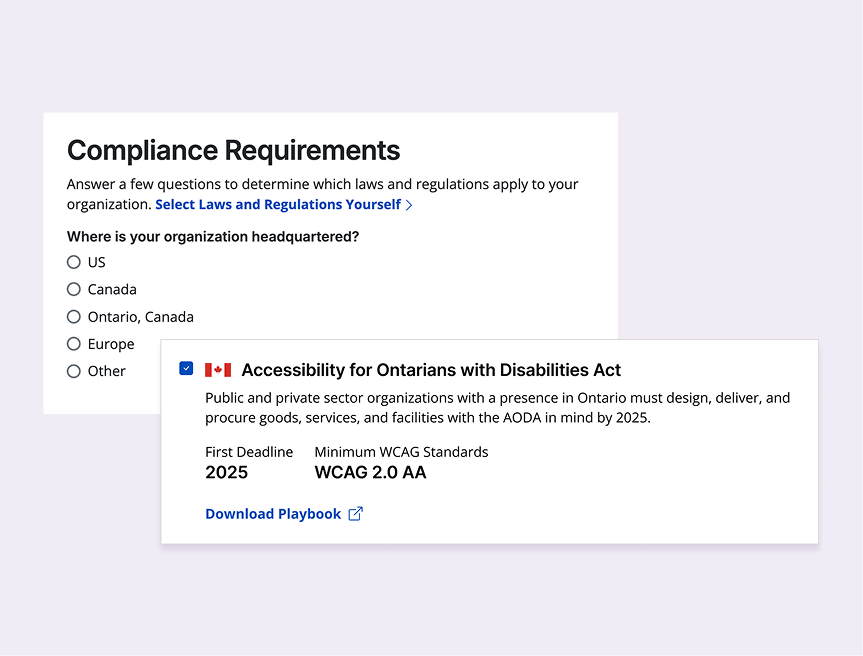
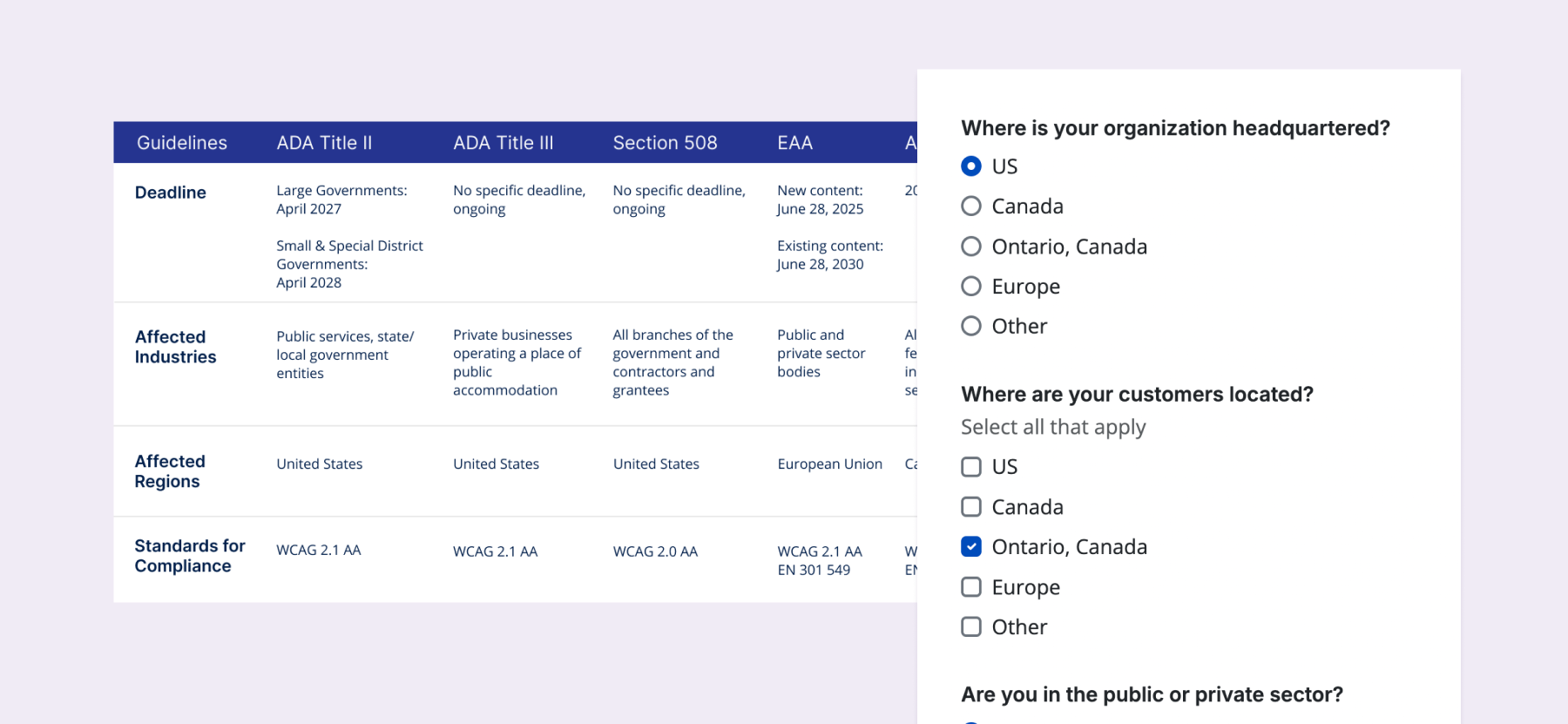
A short guided questionnaire translates a user’s organization, location, and audience into recommended accessibility regulations, while still allowing knowledgeable users to select regulations themselves.
Requirements turn into an actionable roadmap
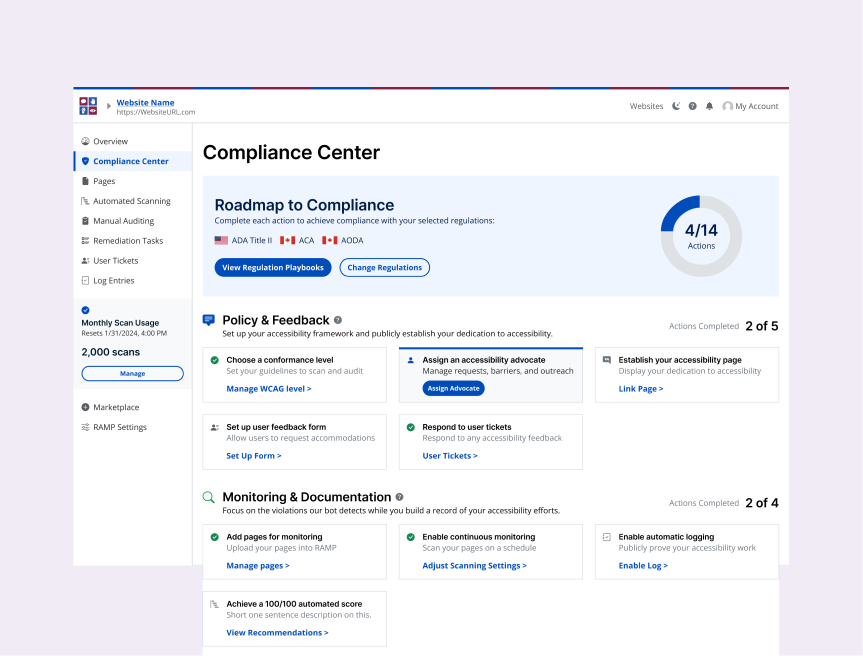
Applicable requirements are consolidated into a roadmap, organized around policy and feedback, monitoring and documentation, and manual testing and maintenance. Each action explains what to do, why it matters, and the requirement it supports.
Make progress part of the broader product
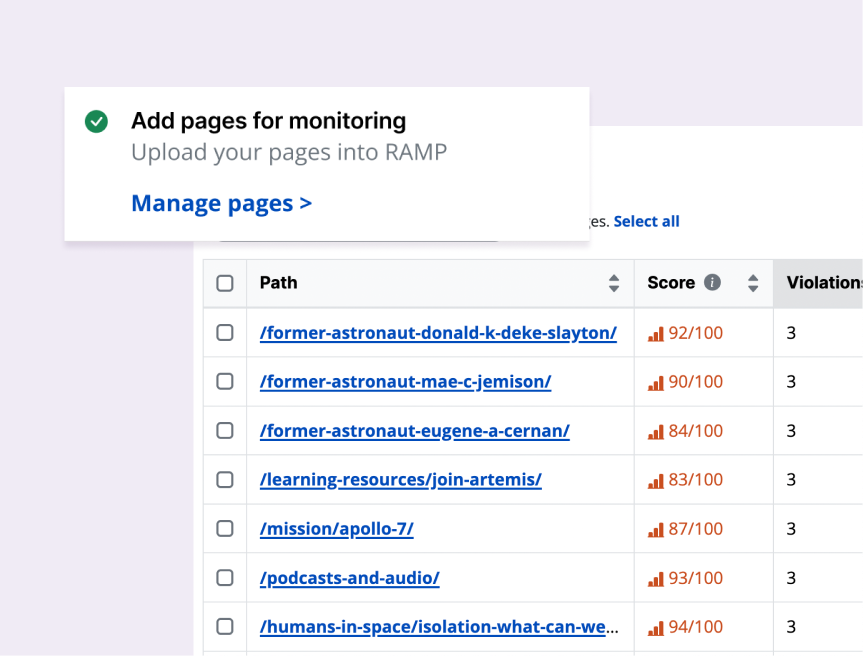
Roadmap actions connect users to the right workflow across RAMP, whether that’s a slideout or an existing tab, keeping the guidance in one place without duplicating the tools needed to complete the work.
Problem
The tools existed. The path did not.
RAMP already supported many of the actions customers needed to improve accessibility, but the experience stopped short of connecting that work into a clear compliance journey.
No regulation-specific guidance or progress tracking. Users had no way to understand which regulations might apply to them or how far along they were in compliance.
Existing tools were fragmented and underused. Accessibility statements, feedback, and documentation existed across separate experiences, some of which required cumbersome setup or manual upkeep.
RAMP explained how, but not enough of the why. Users could learn how to fix accessibility issues, but broader context around why certain actions mattered often lived outside the product.
A business opportunity to shift from reaction to prevention
Accessibility regulations were an underused part of RAMP’s value proposition. The company wanted to position the product not only as something customers turned to after legal pressure arose, but as a way to proactively manage accessibility work and reduce future risk.
The starting brief was intentionally broad: make regulations more meaningful inside RAMP and create a clearer path for customers working toward compliance. Defining what that path actually looked like became the core design problem.
Challenge
How might we turn accessibility compliance, a complex, high-stakes obligation, into a clear, actionable path through RAMP?
Process
I started by understanding the regulations themselves. From there, I mapped those requirements to actions users could already take in RAMP and identified where new guidance or functionality was needed.
Because time and budget didn’t allow for customer interviews during early exploration, I triangulated what I could from several sources: regulatory research, our internal accessibility expert, competitor analysis, conversations with Sales and Customer Success, and relevant sales-call transcripts. Prototype testing and customer interviews came later.
Mapping laws and regulations to product actions
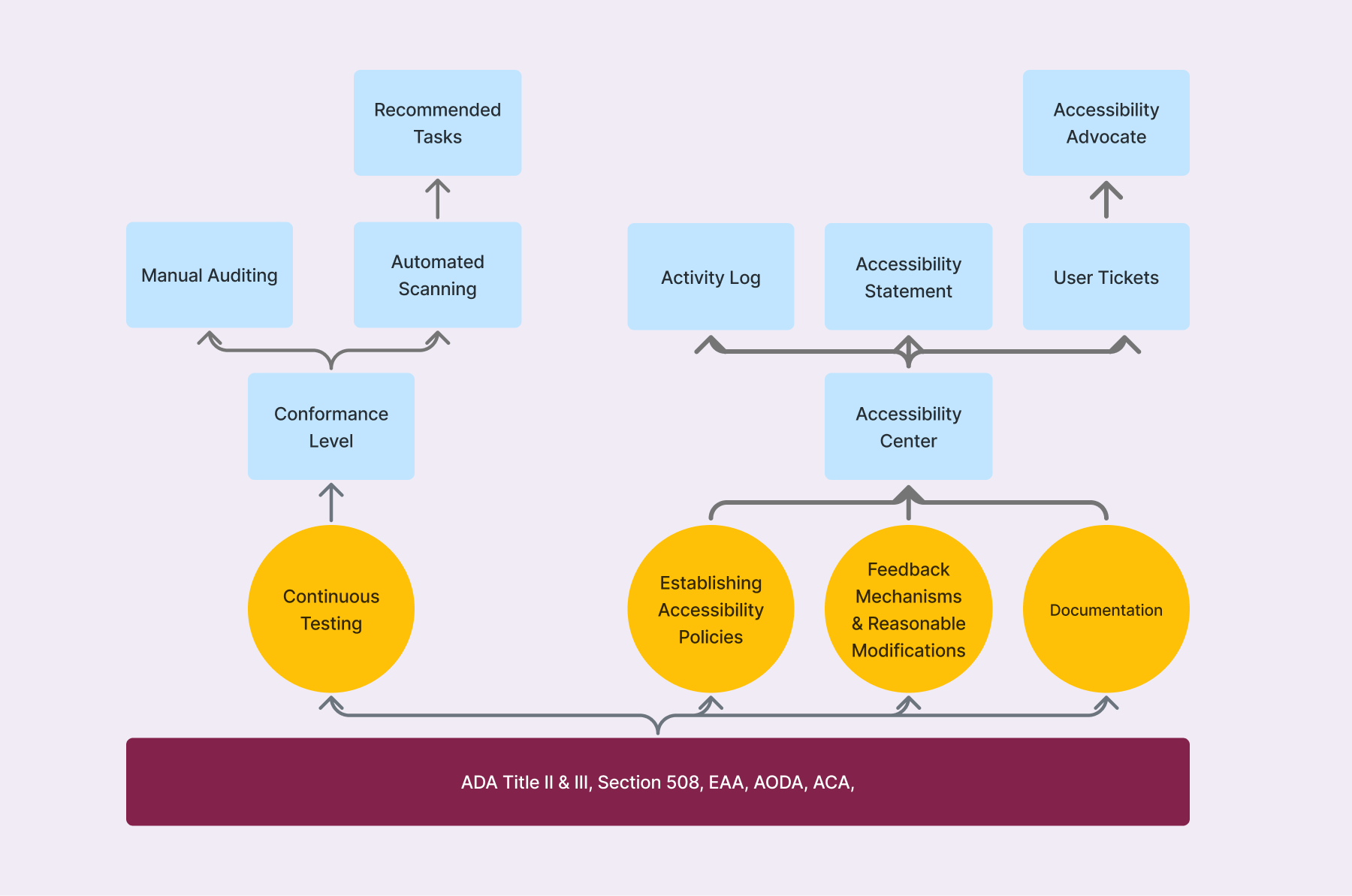
Across the regulations I studied, the specific language varied, but the required accessibility work consistently came back to four areas: continuous testing, accessibility policies, feedback and accommodations, and documentation.
I mapped those requirements to capabilities RAMP already offered, which revealed that much of the underlying work already existed. The bigger gaps were in how those tools were connected and communicated:
Several key tools lived inside the existing Accessibility Center, an embeddable modal with low adoption. Feedback pointed to two barriers: a technically dense installation process and limited white-labeling support.
Documentation relied heavily on manual upkeep, even though RAMP was already tracking much of that activity elsewhere.
The opportunity wasn’t to rebuild everything from scratch, but to connect and improve these capabilities around a clearer compliance journey.
Competitor analysis
Most accessibility products treated regulations primarily as educational content, focusing on explaining requirements rather than helping teams act on them. Others functioned largely as a storage layer for documentation rather than a connected workflow that guided action across the product experience.
I also studied compliance platforms like Drata, where complex requirements are translated into structured, trackable programs with clear ownership, progress tracking, and audit readiness built in. That model was closer to the experience we wanted to create, but also highlighted the opportunity to make accessibility compliance more continuous, actionable, and integrated directly into how teams build products.
Understanding how much guidance users needed
In addition to reviewing meeting transcripts, I interviewed our Sales and Customer Success teams directly, who regularly spoke with prospects facing accessibility litigation or unsure of their legal obligations.
These conversations reinforced that simply surfacing regulations wouldn’t be enough: many users needed help determining what applied to them, understanding why individual actions mattered, and knowing what to do next.
Principles
Make compliance actionable, not academic
Users didn’t need more legal content. They needed help understanding what they could actually do next.
Guide without gatekeeping
The roadmap could recommend a path, but it shouldn’t force one. Any accessibility work is progress.
Make existing work feel connected
Rather than rebuilding workflows, the experience should connect users to the right tools across RAMP.
Constraints
Guide without giving legal advice
RAMP could help users understand regulations and complete relevant accessibility work, but it couldn’t determine legal compliance on their behalf or imply that finishing the roadmap meant they were fully compliant.
Work across an existing product ecosystem
Many roadmap actions already had dedicated workflows elsewhere in RAMP. Compliance Center needed to add context and direction without duplication.
Reducing complex regulations to a few questions
Conversations with customer-facing teams revealed that most users didn’t know which accessibility laws applied to them, so asking them to self-select regulations would have pushed the problem back onto them.
However, to preserve autonomy for more compliance-aware users, it was important to have an option to self-select.
I took the criteria from the major regulations we planned to support and reduced them to a handful of factors that actually changed the recommendation: sector, location, audience, and whether the organization served the public.
From there, I designed a short guided questionnaire that:
Recommended the regulations most likely to apply based on the user’s answers.
Let users review the recommendation before adding it to their roadmap.
Our internal regulations expert validated the logic, helping ensure the quiz simplified the decision without oversimplifying the underlying requirements.
Turning requirements into concrete actions
Once I understood the common requirements across the regulations, I translated them into specific actions users could take in RAMP. Each action connected the requirement to something tangible, like establishing an accessibility page, enabling continuous monitoring, documenting work, or beginning manual testing.
I intentionally ensured users arrived with at least one action already complete. Since conformance level was captured during signup, the roadmap started with visible progress instead of an intimidating 0%.
I then defined how those actions should work based on what users needed to do:
Recognize existing progress
If RAMP already has the info, the action should be marked as completed automatically.
Keep simple setup in context
Lightweight actions could be completed directly from the roadmap without sending users elsewhere.
Route deeper work to the right workflow
More involved actions provided context, then linked to the existing RAMP experience, like Automated Scanning or the Audit Grid.
Breaking apart a rigid, all-in-one experience
The existing Accessibility Center bundled an accessibility page, statement, work log, and feedback form into a single embeddable modal. Only 12% of our user base had installed it, and feedback pointed to a technically dense setup process and limited white-labeling as major barriers.
Rather than carry that container into the new experience, I separated those needs into individual roadmap actions:
Let teams use their own accessibility page and statement instead of requiring a branded embedded experience.
Separate ownership and feedback, with an accessibility advocate and a feedback form teams could place where it made sense on their site.
Automate documentation, using activity RAMP was already tracking instead of relying on users to manually maintain a work log.
This gave agencies and site owners more control over how accessibility resources appeared on their websites while still letting RAMP guide and track the underlying work.
Giving the roadmap purpose
Once the actions were defined, I needed a structure that made the roadmap easier to scan and understand.
My first pass grouped them by how accessibility work happened in RAMP: Basics, Automated, and Advanced. It reflected a natural progression from foundational setup, to automated monitoring, to more rigorous manual testing.
But those labels described our product model more than the purpose behind the work. Through internal discussion, I reframed the roadmap around themes that better matched the intent and language of the regulations:
Policy & Feedback — establish ownership, communication, and ways for users to request support.
Monitoring & Documentation — continuously identify issues and build a record of accessibility work.
Manual Testing & Maintenance — uncover issues automation can’t detect and establish an ongoing accessibility practice.
The new structure made the roadmap feel less like a tour of RAMP features and more like a cohesive accessibility program.
Simplifying the roadmap when structure became too much
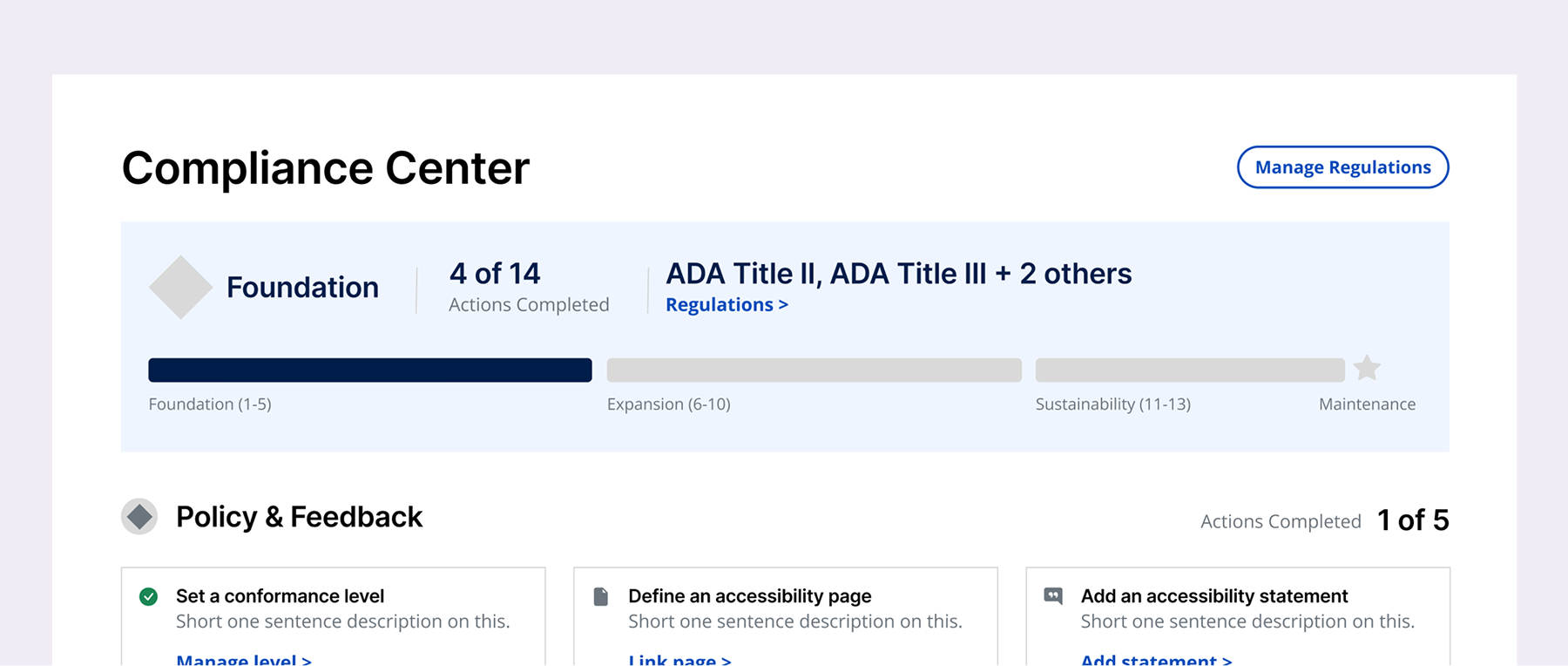
With the actions and categories in place, I explored adding a second layer of progression to make a long roadmap feel more manageable: Foundation, Expansion, Sustainability, and Maintenance. Users would advance through phases as they completed more actions.
The idea made sense conceptually, but lightweight testing showed that the extra hierarchy was working against us. People were already processing individual actions and category labels; adding phase names gave them one more system to interpret.
I removed the phases and kept the simpler category-based roadmap. The goal was to make the work feel approachable, not introduce another framework users had to learn before they could get started.
Making progress visible without prescribing a path
With the phase system removed, I simplified progress to the clearest signal we had: the number of roadmap actions completed.
Actions were placed in a suggested order based on effort and what would help organizations establish a stronger accessibility foundation first, but that order was never enforced. Any accessibility work was meaningful progress, so users could move through the roadmap however it made sense for them.
The result was a straightforward tracker that showed momentum without adding another scoring system or implying that a percentage equaled verified compliance.
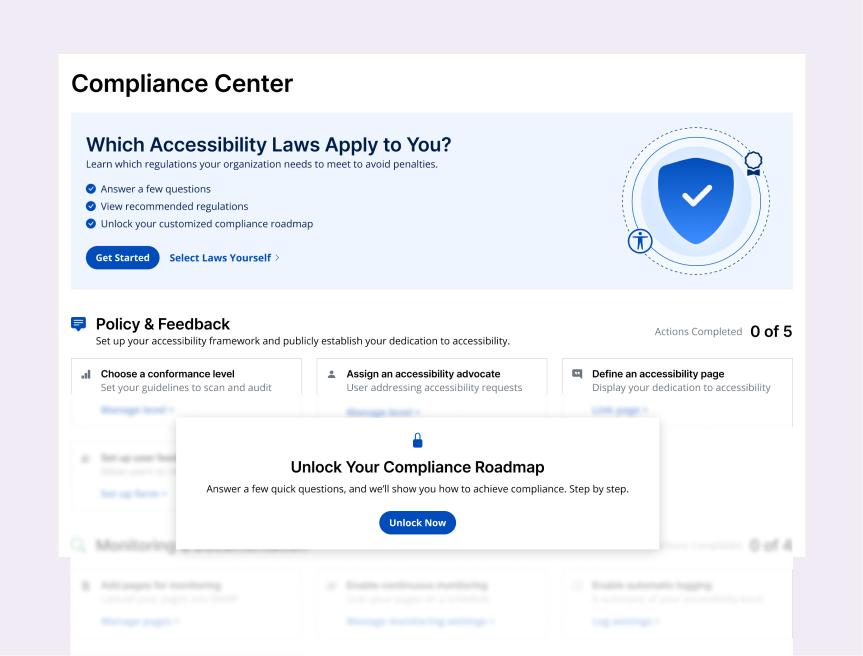
Entry points and teaser moments
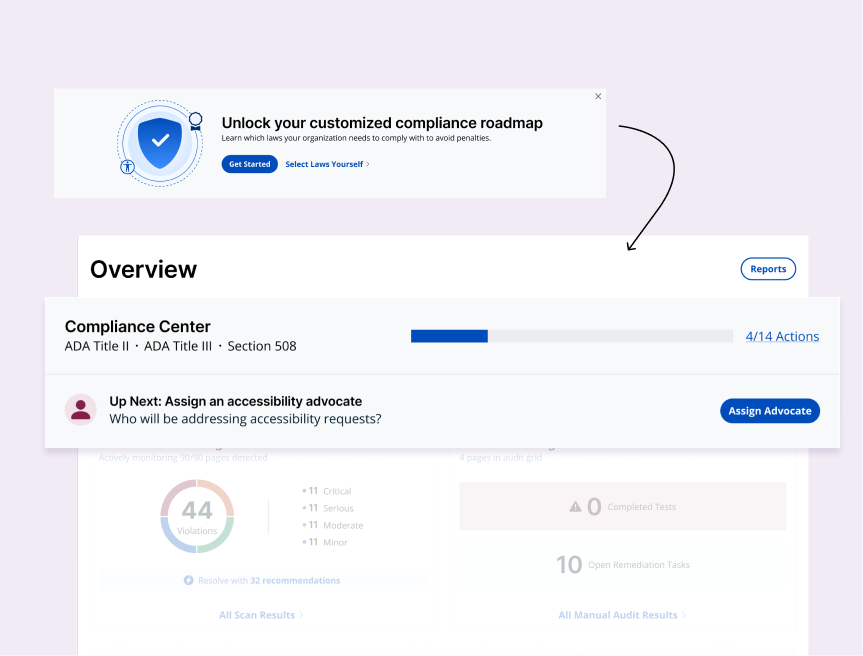
As compliance became a more central part of RAMP’s value proposition, I didn’t want the new experience to depend on users simply stumbling across a navigation item.
I created two entry points:
A prominent dashboard callout introduced the personalized roadmap and provided them with a direct path to the quiz.
A dedicated Compliance Center tab gave the experience a permanent home while also serving as a subtle teaser—highlighting the roadmap's value and inviting users to either take the quiz or self-select regulations when they were ready.
Once setup was complete, the dashboard space could shift from introducing the feature to showing roadmap progress and the next recommended action, keeping compliance visible beyond onboarding.
Designing a finish line we could responsibly stand behind
I initially explored a more celebratory completion state, including confetti when users finished every roadmap action. But completing the roadmap alone wasn’t enough to verify compliance, and a definitive ending risked framing accessibility as a one-time project.
Instead, I made expert verification the final roadmap action and reframed completion as a transition into Maintenance. Users could still recognize the milestone, but the experience reinforced that accessibility requires continued monitoring, testing, and upkeep.
This preserved a sense of accomplishment without overstating what RAMP could guarantee, and created a natural path into our accessibility services when users wanted their work formally reviewed.
Testing the core flow before launch
With the full experience in place, I ran lightweight prototype testing around the two most important tasks: figuring out which regulations applied and understanding what to do next. Most participants entered through the dashboard and chose the guided quiz rather than selecting regulations themselves.
Testing surfaced a few final refinements:
Combine work users saw as one task
The accessibility statement and page were initially separate actions. Because the statement ultimately lived on the accessibility page, users expected them to be handled together, so I combined them into one action.
Clarify what accessibility advocate means
Some users worried that assigning an advocate meant publicly attaching their name, or legal responsibility, to an inaccessible website. I clarified the role, its limits, and that the contact email would remain private.
Add support where questions felt uncertain
Examples and tooltips helped clarify questionnaire questions, while a direct path to our team gave users another option when they weren’t comfortable making a regulatory decision on their own.
Impact
~5× growth in key setup actions
More customers established an accessibility page and assigned someone responsible for accessibility after those actions became flexible, standalone workflows.
~80% greater clarity and confidence
Users reported a better understanding of accessibility requirements and what to do next.
From automated scanning to a broader accessibility practice
In a post-launch interview, one agency owner told me Compliance Center helped her understand regulations and discover RAMP features she hadn’t previously used. She now uses it across 40+ client websites, with at least 8 roadmap actions completed on each.
After relying mostly on automated scanning, she began incorporating manual testing and even uses roadmap progress as a competitive driver between clients, encouraging them to keep pace with one another.
Learnings and future refinements
Users didn’t need to become experts in accessibility law; they needed enough context to make confident decisions and a clear path into the work.
Make ongoing progress feel rewarding
I’d continue exploring milestone-based moments, including badges or lightweight celebrations, that recognize meaningful progress without implying that accessibility is ever finished.
Strengthen the maintenance experience
The current roadmap transitions into Maintenance after the initial actions are complete. I’d evolve that state further around recurring monitoring, periodic manual testing, and clearer prompts for what users should revisit over time.
Expand regulatory coverage
The first release focused on the highest-priority U.S., Canadian, and European regulations. As the framework proves itself, the same model can support additional international and regional requirements without rebuilding the experience from scratch.